do the assignment first. reading the answer is not the same as doing it, and u will feel like u learned it when u didn’t.
back to the chapter · see it running
▶ open the solution in the playground
styles.css:
/* 2 */
body {
  font-family: Roboto, Verdana, Arial;
}

/* 3 */
.big   { font-size: 30px; }
.bold  { font-weight: bold; }
.light { font-weight: 300; }

/* 4 */
.no-underline { text-decoration: none; }

/* 5 and 6 */
.long {
  width: 380px;
  line-height: 28px;
  text-align: center;
  background-color: rgb(235, 235, 235);
}

/* 7 */
.highlight {
  color: rgb(0, 100, 200);
  font-weight: bold;
}

/* 9 */
.search-bar {
  height: 36px;
  width: 300px;
  border: 1px solid rgb(190, 190, 190);
  border-radius: 2px;
  font-size: 18px;
}

.search-bar::placeholder {
  color: rgb(150, 150, 150);
  font-size: 14px;
}index.html, inside the body:
<p class="big">thirty pixels</p>
<p class="bold">bold</p>
<p class="light">font-weight 300</p>

<a class="no-underline" href="https://youtube.com">a link with no underline</a>

<p class="long">this paragraph is long enough to wrap over several lines, which is
  the only way to see what line-height and text-align are doing to it.</p>

<p>go and look at the <span class="highlight">shop</span> before u decide</p>

<!-- 8 and 9 -->
<input class="search-bar" type="text" placeholder="Search">

<!-- 10 -->
<p>
  <input type="checkbox" id="agree">
  <label for="agree">a checkbox with a label u can click</label>
</p>
output:
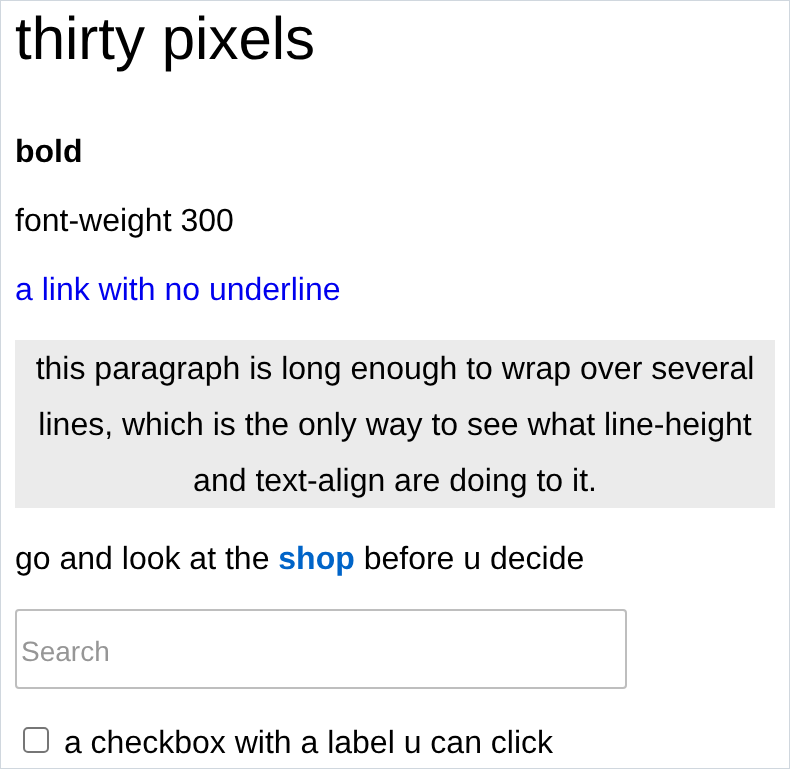
- in 3, the
font-weight: 300line looks exactly like normal text. that is correct. the font in use has a regular and a bold and nothing in between, so 300 rounds to 400. a weight u did not download does not exist. - in 2, i asked for Roboto first and did not load it, so the browser walked the stack until it found something on the machine. that is the fallback list working, not failing. if u want Roboto for real, add the google fonts links from chapter 5.
- 6 is the important one. the text inside the grey block is centred and the grey block
itself is still hard against the left edge of the page.
text-alignmoves the words, not the box. centring the box needs margin, and that is chapter 7. - in 9, the box says
font-size: 18pxand the placeholder is 14px. two rules, two different things. if u only set it on.search-barthe placeholder does not follow. - in 10, click the words, not the square. if the box ticks, ur
formatches urid. if it does not, they are spelled differently. - the gaps above and below every paragraph are the default
<p>margin. u did not add them and u cannot remove them yet. next chapter.