do the assignment first. reading the answer is not the same as doing it, and u will feel like u learned it when u didn’t.
back to the chapter · see it running
▶ open the solution in the playground
/* styles.css */

/* 1 */
.box {
  background-color: rgb(255, 220, 130);
  width: 200px;
  margin: 30px;
  padding: 25px;
  border: 6px solid rgb(200, 60, 60);
}

/* 3 and 4 */
.side-by-side {
  display: inline-block;
  width: 120px;
  margin-right: 30px;
}
.pulled { margin-left: -40px; }

/* 5: these 3 are all legal, they just say different things */
.a { padding: 20px; }
.b { padding: 10px 40px; }
.c { padding: 5px 10px 30px 60px; }

/* 6 */
body { margin: 0; }
p { margin-top: 0; margin-bottom: 0; }

/* 9 and 10 */
.group {
  display: inline-block;
  vertical-align: top;      /* 10 */
  width: 190px;
  border: 1px solid rgb(160, 160, 160);
  padding: 10px;
  margin-right: 10px;
}

/* 13 */
.card {
  display: inline-block;
  vertical-align: top;
  width: 150px;
  margin-right: 10px;
  padding: 8px;
  border: 1px solid rgb(60, 120, 180);
}

/* 14 */
.centred {
  width: 300px;
  margin: 0 auto;
}
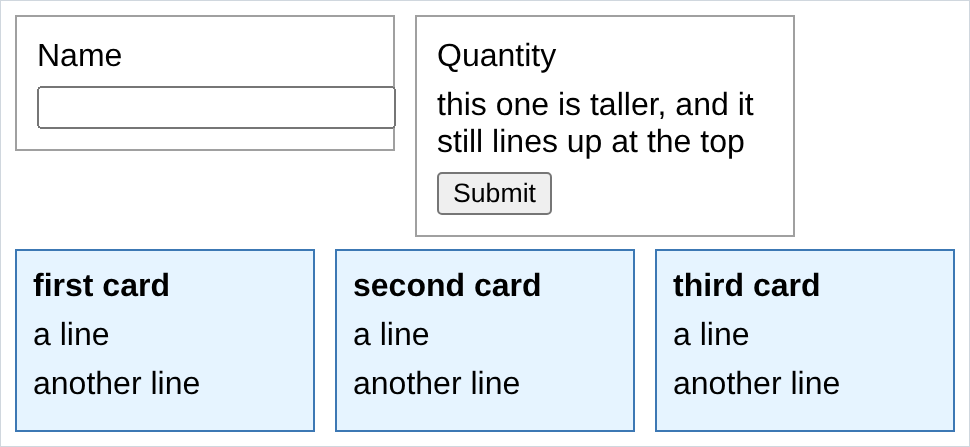
output of 9, 10 and 13 on one page:
output of 14:

output of 15:

- in 2, padding gets the background colour and margin does not. the coloured area of the element runs out to the border and stops. that one picture is the difference between the two properties and it is worth more than any definition.
- in 8, nothing happened because
widthandheightdo not apply to an inline element. change it todisplay: inline-blockand the same line starts working. this is the single most common “css is broken” moment and it is never css. - in 10, without
vertical-align: topthe short panel drops down so its text baseline lines up with the tall one’s. with it, they both start at the top. compare it against section 10 where i left it out on purpose. - if ur boxes in 3 have a gap u did not ask for, that is note 2. the newline between the two tags is a space. it is not ur margin being wrong.
- in 14,
margin: 0 autoonly centres an element that has awidth. with no width the element is already as wide as the page and there is nothing left over to share out. - in 15, red wins. an inline
style="..."beats anything in a stylesheet, and the only way to beat it back is!important, which u should treat as a thing that exists rather than a thing u use. - in 1, the devtools box model panel is at the bottom of the Styles tab. it will say
30all the way round the outside,6on the border ring,25inside that, and200in the middle. those are the 5 numbers u typed, drawn back at u.